If your sentence is too wordy
Sometimes, even when your request is clear, you might want to reduce the amount of words you’re using. This could be due to many reasons such as having too many polite phrases, explanations and vague language. Using this free tool, we will go through how to reduce the number of words in our sentence by restructuring it. In this case, we will look to keep the request, deadline and explanation clear and simple.
For this test, we are using just one sentence. The original sentence can be seen in the first screenshot. The sentence itself uses a long opening statement and vague request. This is a good example of a sentence that could be improved upon, without needing to use private messaging or anything related to a real event. The sentence has been made specifically for this review.
The outcome was the shortened sentence, followed by three options. We chose the option that had the action at the start. This means our final outcome can be read straight from the interface. The steps taken to create our final outcome are clearly outlined in this guide. It doesn’t mean that we tried every style and option for rewriting, but the steps taken are clear.
Identify what needs to stay in the sentence
Before putting anything into the tool, write down what the sentence needs to include. Who is doing what? What is the deadline? Is there an explanation? By knowing this, you can identify if your sentence has been made worse by trying to make it smoother. Changing the deadline or removing a required condition may not be ideal.
For our workshop example, we need the sentence to include a request to send questions, a deadline before Thursday and an explanation. Whilst we can restructure the sentence or use simpler language, we shouldn’t create a new action, change the deadline or guarantee preparation.
Keeping the original sentence visible whilst working through the process will help. Whilst we are using just one sentence, it will be easy to compare. However, if you are using longer sentences, this will be a good habit to get into. If there is anything in the sentence that isn’t your idea or a fact from a source, just changing the language won’t help you attribute it correctly. If you are completing assignments or work documents, ensure you are following the correct rules for using assistance.
Choose how you would like to rewrite
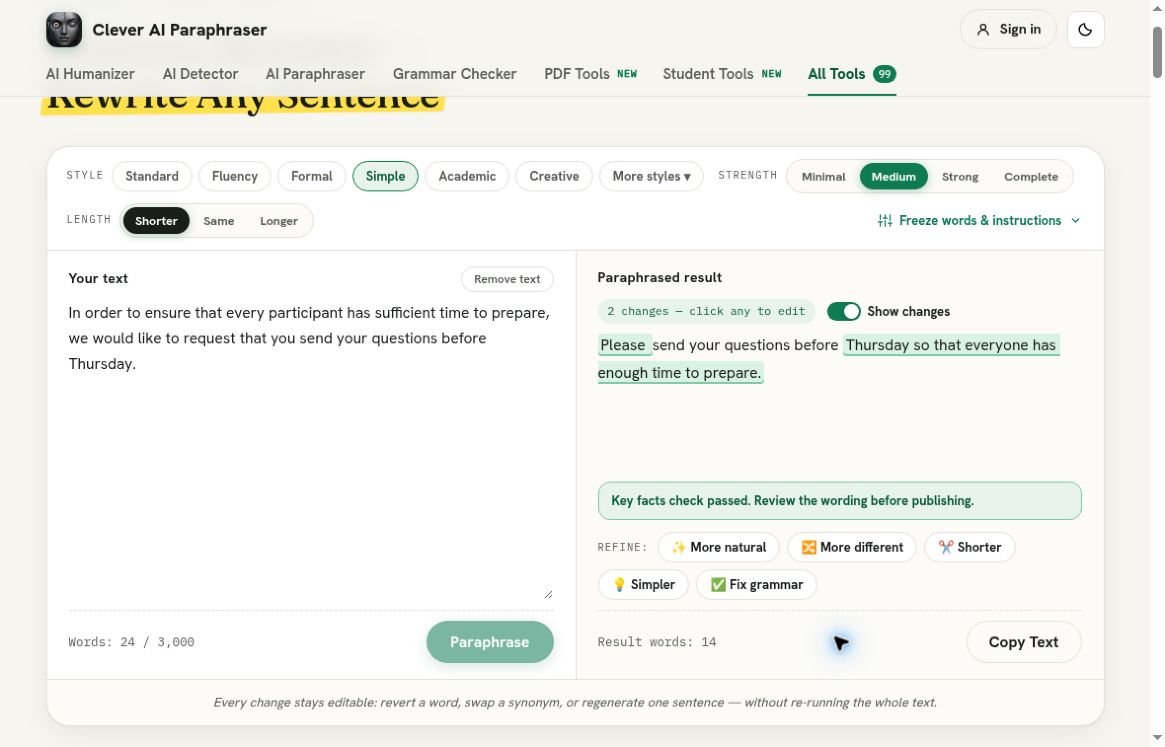
Go to the Sentence Rewriter page. There are options above the sentence to choose what style, strength and length you would like. For our test, we chose to keep it simple, medium strength and short. This tells us that we are looking to simplify our sentence, make meaningful changes and keep it shorter. These aren’t recommendations for every sentence.
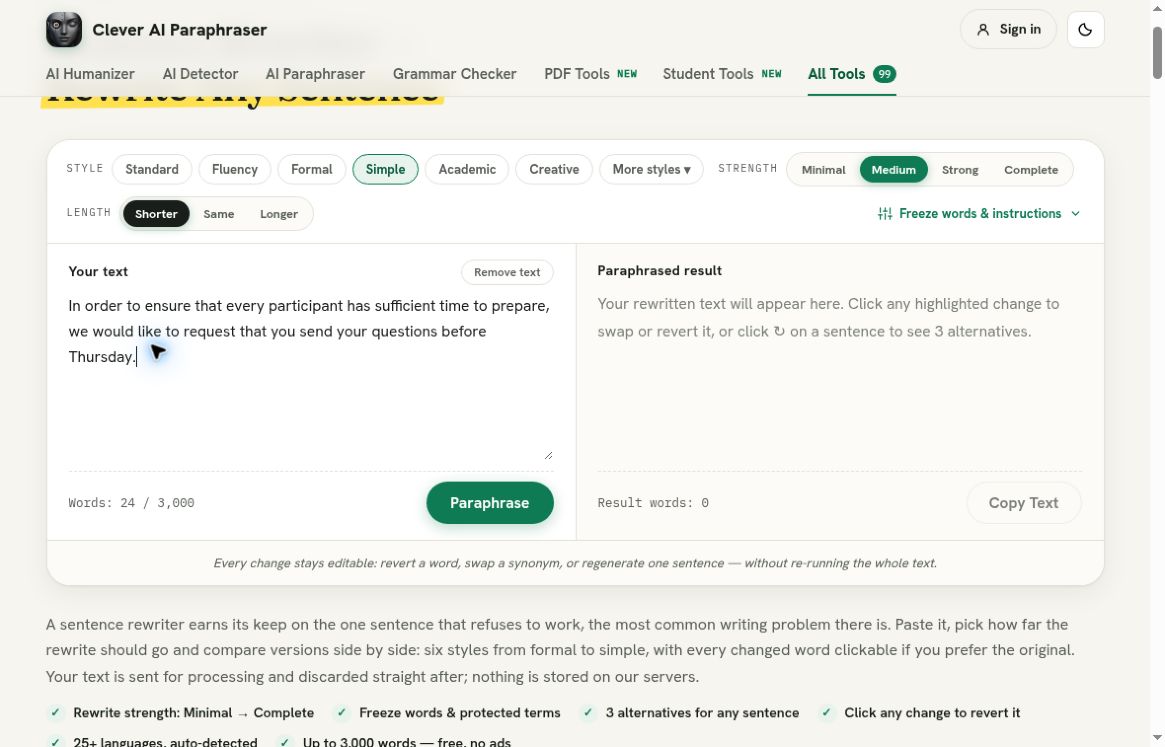
Once the original sentence from screenshot one has been added to the text box, press the paraphrase button. The interface will quickly tell you it is rewriting your sentence. You will then see a side-by-side view of your original and rewritten sentence. The first outcome had 15 words (seen in the counter). The request to send questions, explanation and deadline had been kept. The exact outcome can be seen in screenshot two.
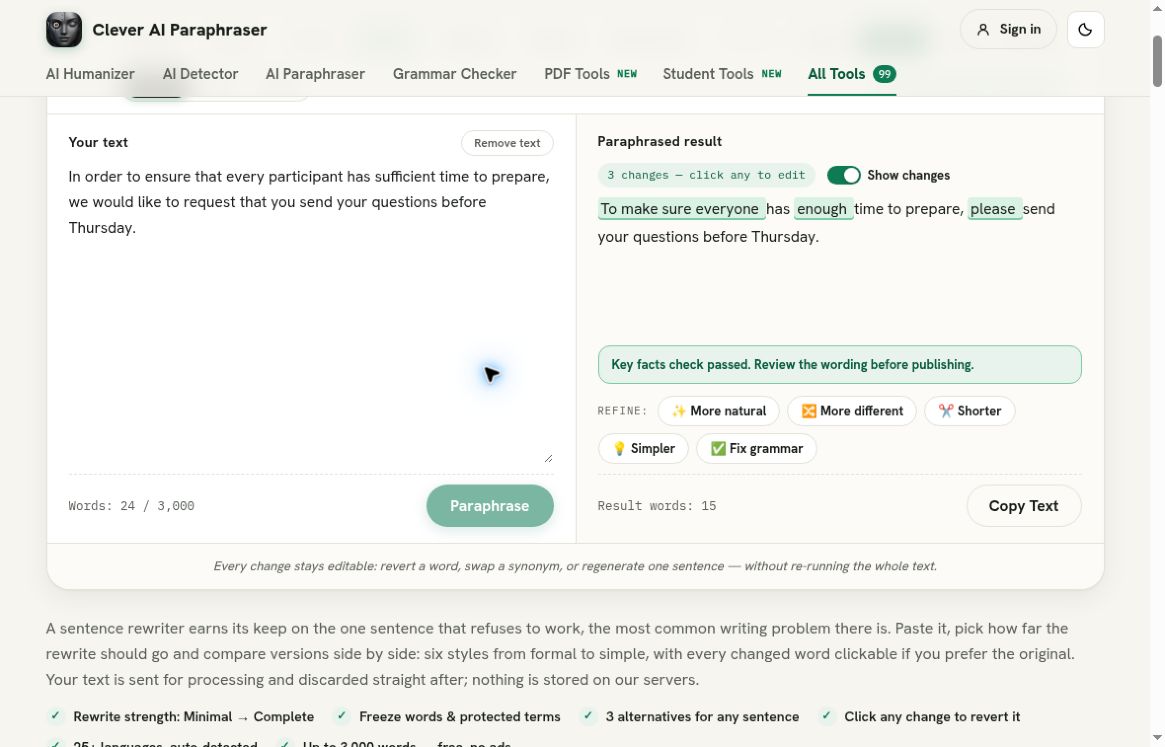
The interface also told us that our key facts had passed and to check the language before publishing. Whilst this is a helpful feature from the tool, we can still compare the sentences ourselves. We can also see that the date and request have been clearly stated in the outcome. This gives us more evidence that this is a good outcome for our example. The tool can’t know all the implications you want to include unless they are in the original sentence or instructions.
If the issue is with the flow of your sentence, read it out loud. Can you see the action quickly? Does the explanation still link to the request? Is the tone appropriate for your relationship? Just because it’s shorter doesn’t mean it’s kinder, clearer or better. By removing a polite phrase, you can make your message efficient but in some situations, it may appear to be more abrupt.
Look at the sentence options
Use the button next to the sentence to view the options. Initially, you will see a loading message. Once it has loaded, you will see three options. We had actually used this feature. The options were based on the basic request and explanation but were structured differently. This meant we had a few options to choose from without having to create a new input.
Screenshot three shows the three generated sentences.
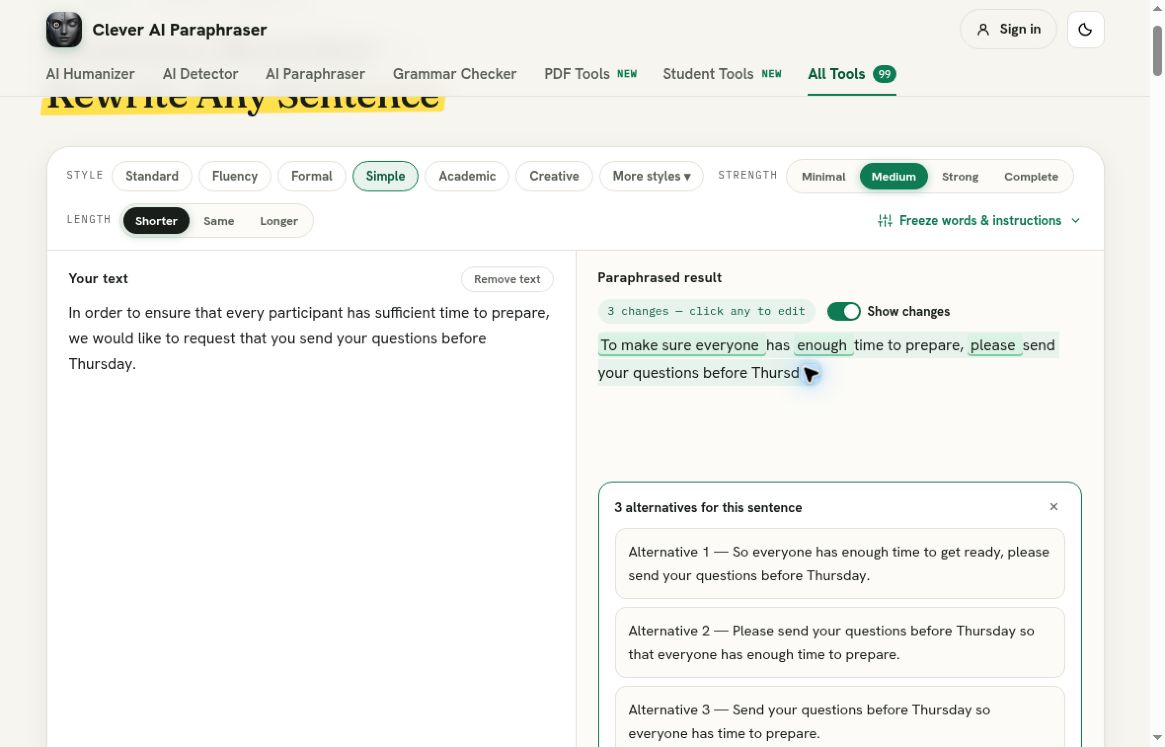
We chose option two. This had the action at the front, followed by the deadline and explanation. This is a good format for a reminder as the action is clearly stated. The exact sentence can be seen in the screenshot. This isn’t a promise that we will get the same sentence if we run it again.
The main outcome had changed. The final outcome had 14 words (seen in the counter) and the deadline and explanation were still included. We can see that the outcome has changed by reading it. This is important as we want to ensure that our outcome has actually changed.
Screenshot four shows the action first option.
What has changed?
We had a 24 word sentence. Our first outcome had 15 words and our final outcome had 14 words. More importantly, the key facts were still met. We still had the action to send questions, deadline before Thursday and explanation. We are looking to improve the structure of the sentence to keep it short.
We haven’t tried to copy, upload files, lock words, add custom instructions, tried every style or other refine options. We can see these options but have only verified the steps we have outlined. The data handling statements on the page weren’t relevant to this review. As this was a sample, we didn’t need to worry about private information.
A good tip to remember is that once your sentence is doing what it needs to do, stop! Too many changes can cause the focus to change and useful information to be lost. Compare your final option to the original purpose. Read it in the paragraph to see if it helps the reader. If the original sentence was clearer, then it is a valid editing choice to leave it.
If you are using this for real correspondence, ensure you have included any extra details. If you are asking for questions, you may want to include an email address for them to reply to, link to submit their questions or explain what type of questions you want. The Sentence Rewriter won’t be able to provide you with these facts responsibly unless they are included and appropriate to include.
This test shows how useful a targeted rewrite tool can be. By outlining what the sentence needs to say, how you want to rewrite, checking the first outcome, comparing options and verifying your outcome, you can create a clearer sentence. If you have one sentence that is holding back your finished draft, this free sentence rewriter can help you try a clearer option.